SPARTACUS
Spartacus project tools
Bookmarks on this page
MEPLAN
RASTER Methodology
The USE-IT Module
MEPLUS
The MEPLAN concept
MEPLAN is a computer software package designed to answer questions about planning and the environment. It is based upon a general abstract modelling framework which incorporates facilities to analyse the interactions between economic activities and transport within a single integrated framework.
The MEPLAN software provides an powerful analytical tool. It can be used to forecast the effects of a change in transport on land use or development potential—and vice versa. It can also be used to evaluate alternative development strategies and incorporates an economic evaluation module which allows the costs and benefits of different investment decisions to be quantified.
The whole idea behind MEPLAN is that land uses, transport and the environment are inextricably linked and cannot be planned in isolation. To illustrate this point, consider a proposal for a new development on an accessible greenfield site. The proposal looks attractive but what might happen if the development proceeds? Will it generate so much economic activity—and hence traffic so as to ultimately reduce accessibility by adding to congestion in the surrounding area? If this does happen, will land values fall as a result, and if so by how much and over what period of time? Moreover, what impact might the development have on the local population and environment in terms of vehicle emissions, traffic noise and accident risk? On balance, therefore, is this really a sustainable development option?
All of these questions are, of course, pertinent to planning and investment decisions. The complex interactions between supply and demand for transport and land use mean that they are not, however, straightforward to answer. MEPLAN helps to answer these questions by providing a consistent framework within which a model of the real world can be developed. The MEPLAN model brings together the relevant information on transport, land use and economic activity. Development strategies can then be simulated through the model by changing the inputs in order to represent a proposed change in the real world. The model outputs then provide an indication of the wider socio-economic and environmental effects of introducing the change and these effects can be evaluated against an alternative strategy or a "do-nothing" scenario.
MEPLAN draws upon many of the ideas and theories discussed in Chapter 1 but differs from most other operational modelling systems insofar as it provides a context free environment for model development. This feature of the package means that no two MEPLAN models are identical. Instead, the user is free to build a model which is based upon information and relationships which best describe his particular area and level of interest. This flexibility has been exploited in the development of the models for the SPARTACUS test cities and it will be seen later that this has enabled the very different characteristics of each to be represented in a realistic manner.
MEPLAN model basis
MEPLAN is based upon three key assumptions:
Transport is a derived demand resulting from economic interactions between activities; for example, the transport of goods, services, and labour from places of production to places of consumption.
Transport is an influence on the location of activities over time. Hence, transport changes make places more accessible to markets and sources of inputs increasing the demand for products, services and labour produced in those places.
Transport and land use are treated as markets where the interaction between supply and demand establishes the price of transport and land.
These assumptions give rise to the structure of the model which draws upon the following theory.
Interactions between activities are determined by input-output analysis with a mix of fixed and variable coefficients. These coefficients state how much of an input factor is required by households in different socio-economic groups, or the volume of floorspace per worker required by different employment types.
Locational choices, transport modal choices and assignment are determined by random utility models. Such models ensure that patterns of transport and location are determined by a combination of non-modelled elements (reflecting the idiosyncrasies and particular tastes of each individual) and, to a larger extent, modelled travel and location costs or "disutilities".
Capacity restrictions in the land and transport markets alter the prices and thus affect disutilities. For example, if the demand for housing in a zone is high, then housing costs will be increased, and if the demand for travel along a section of road increases, then the travel time will rise due to congestion.
Figure 3
The model framework
Top of the page
RASTER Methodology
Some indicators for assessing urban sustainability require a disaggregate representation of space. The modelling of locally important environmental processes and their social implications require the exact spatial location of input information and output data. Raster cells or pixels can be used as spatial reference framework for environmental and social impact models. However, most of the data available and most urban models are spatially aggregate and work within a zonal framework. The option to overcome the mismatch between the required spatial framework and existing data and models chosen in the SPARTACUS project is to maintain the zonal organisation of the model and to add a disaggregate raster-based representation of space for specific modules, for instance for the calculation of local environmental impacts of policies. For this purpose the so-called Raster Module has been developed.
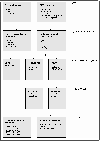 Figure 4
The structure of the Raster module
The Raster Module is based on the spatially aggregate MEPLAN models for the three test cities. Several steps have to be undertaken to arrive from the vector representation of model zones and networks to small-scale environmental and social impacts and to a re-aggregation to indicators for assessing sustainability.
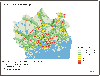
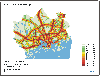
There are two main sources of input information for the Raster Module. On the one hand there is a spatial database containing zone boundaries and main land use categories recorded as polygons and the network coded as vectors. On the other hand, there are the results from the MEPLAN model, of which (i) households by socio-economic group, (ii) employment and (iii) floorspace, all by zone, as well as (iv) link load by network mode are used. This information is then converted to a raster data structure, i.e. to raster cells. Subsequently, environmental submodels are employed to assess land coverage, air quality for several pollutants from road transport and noise levels for the raster cells. The estimation of the social impacts of these environmental impacts are the task of the next level of submodels in which the exposure to air pollutants and to traffic noise in residential areas are estimated. The output of the Raster Module are five indicators for the SPARTACUS urban sustainability indicator set and graphical presentations in the form of the concentration maps for air pollutants and of noise level maps.
General
The USE-IT module is a decision support software for evaluating policies, and alternatives in general, designed in the SPARTACUS project. Besides the general decision support methods, direct weighting and the Analytical Hierarchy Process (AHP) pair-wise comparing system, it has several features which help standardised testing of a wide variety of alternatives. The most important of these features is the predefinition of the common indicators used in the SPARTACUS project.
The USE-IT module has a partial theoretical background in a decision support program called HIPRE 3+ (Helsinki University of Technology, System Analysis Laboratory). HIPRE 3+ integrates two decision analysis techniques: the Analytic Hierarchy Process (AHP); and the Simple Multiattribute Rating Technique (SMART).
In both techniques the main idea is that, after designing the evaluation structure, the weighting strategy could be considered with ease and transparency while keeping in mind the phenomena in the background of the evaluation model.
Figure 7
Interfaces of the USE-IT module.
The USE-IT module is a Microsoft Visual Basic application and uses a Microsoft Access type database. It works also independently, without the other components of the SPARTACUS system. The indicator data can be loaded either from an external database or input manually (see Figure 2-31). After loading the data, USE-IT works as an independent system.
In the SPARTACUS system, the MEPLAN and Raster module results are loaded into USE-IT via MEPLUS. The indicators of justice and the consumption of construction materials are calculated in USE-IT from the data provided by MEPLUS, MEPLAN and Raster.
Operating the USE-IT module
Defining the problem and the evaluation task
In the SPARTACUS project, one of the main goals has been to improve the sustainability of European cities by testing different transport/land use policies. In other words, the problem was to find the best policy to fulfil the goal or, more generally, to find out how good the results of a certain policy are based on the indicator values produced during the process.
Defining the structure of the evaluation hierarchy
The structure of an evaluation is a hierarchical grouping of subgoals that should be independent (see Figure 2-32). In the SPARTACUS approach, sustainability is viewed as consisting of environmental and social sustainability as well as economic efficiency. Separate evaluations are made for the first two components. Economic indicators have a common unit, and their aggregation does not necessitate the use of USE-IT. Nevertheless, if one wishes to carry out sensitivity tests on e.g. the value of time, the USE-IT software may be utilised.
Subgoals can further be divided into a further level of subgoals etc. For example, environmental sustainability includes the themes of air quality (EA) and the use of natural resources (ER) and, further, the air quality theme consists of indicators defined in terms of greenhouse gas emissions by transport (EAGT), acidifying emissions by transport (EAAT) and emissions of volatile organic compounds by transport (EAOC).
Weighting of the indicators
In USE-IT, two methods can be used for giving weights: Direct weighting method: proportional weights are given directly for each subgoal. Pair-wise comparison method: weights are calculated with an Eigenmatrix method from the matrix created in the AHP process, where the indicators are compared pair-wise with each other.
 Figure 8
The hierarchical goal system.
When the number of indicators exceeds two, the comparison is not automatically consistent. For example, in the case of three indicators A, B and C, if rAB = 2 and rBC = 3, then rAC should be 6. But as rAC is not calculated from rAB and rBC but, instead, the respondent is free to evaluate it separately, the resulting matrix is not likely to be perfectly consistent. For this purpose, a consistency ratio is calculated which is visible to the user so that (s)he can monitor the consistency of his/her judgements.
Value functions
In connecting the alternative policies to the indicators, a value function is given to calculate the degree of desirability of the indicator values. The input of the function is a measurable term of the indicator phenomena of a certain policy, like annual emissions per inhabitant and value of the function is a relative "goodness" rate of this policy for the part of this indicator. The input of the function contains a measurable indicator, such as the annual emissions per inhabitant, for a certain policy. The value of the function is a measure of the relative "goodness" of this indicator value.
As has been discussed earlier, the value functions must fulfil the condition that for each possible pair of x values (x1 and x2) it must hold that v(x2) > v(x1) if and only if x2 is preferred to x1 and vice versa. In the present context, this has been interpreted so that the value function does not have to be valid for x values that do not occur. What this means in practice is that a value of v(x) of 0.8 has generally been assigned to the best x value of an indicator whereas the worst x value, brought about by any of the policies tested, has been assigned a v(x) value of 0.2. The allowance of 0.2 at each end of the scale has been left in order to minimise the need to change the functions in case the verification of results resulted in any changes in the x values. This makes the system policy sensitive but, at the same time, it emphasises the fact that the evaluation is relative and not absolute.
Policy evaluation
About 10 to 15 policies can be evaluated simultaneously. The USE-IT module provides a copy option to create a new evaluation structure from an existing one. After that, only the policy names remain to be changed and new external data to be loaded.
As a decision support program, USE-IT calls for an individual evaluation. Starting by changing the theme level weights everyone can give his personal judgement of the actual data. By changing systematically the largest weights a sensitivity analysis can be performed.
Another method for sensitivity analysis is to assess the risk of the wrong decision. In USE-IT it is possible to generate random evaluations where each evaluation coefficient is generated from the original value within a given standard deviation. This standard deviation can be set for each weighting and rating level separately. The program calculates from the generated evaluations the actual 1.96*standard deviation limits showing, on a 95% confidence level, the range of possible index values by policy.
Results
During the evaluation, each part of the data and the results can be examined interactively. The main results are shown in one graph which gives different views of the results. Several output options are available in graphical or table form.
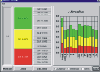 Figure 9
An example of results output from USE-IT (19 kB)
Top of the page
MEPLUS
MEPLUS is a GIS-based policy analysis tool designed primarily to manipulate and process the very large volume of model outputs produced within the SPARTACUS system. The MEPLUS module stores these outputs in a structured database which is integrated with a set of procedures for analysing and displaying policy test results.
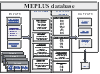 Figure 10
The main information content of the database (31 kB)
The main information content of the database is described in Figure 2-23. This also shows the main sources of data input to the module and indicates the destination of the analysed outputs. The system is accessed via a simple menu-driven interface and presents the user with a choice of analysis facilities which are based largely on pair-wise comparisons of policy results.
Figure 2-24 illustrates the main functions of the module. These include:
Data capture: a set of procedures for reading and labelling MEPLAN and RASTER output files
Data storage: a relational database facility based upon a proprietary system (Microsoft Access) which enables run time analysis of results
Data manipulation and classification: simple facilities for searching and selecting or filtering data, together with facilities for performing user-defined spatial and aspatial classifications and aggregations
Indicator calculations: original computation of the majority of the sustainability indicators produced by the SPARTACUS system (economic, environmental and social).
- Analysis and display: a variety of procedures for analysing and summarising policy test results in the form of cross-tabulations, simple ratios and charts
Mapping: spatial data display options for producing a range of thematic (land use) maps and network maps
Reporting: a selection of output options for screen-browsing of results, together with an automatic report generator which provides a permanent record of the policy analysis
The MEPLUS functions are offered to the user via a set of procedures which appear as buttons on the title screen. These guide the operation of the system through the various steps from loading in and classifying model outputs to running and reporting on the analysis.
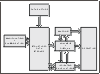 Figure 11
Main functions of MEPLUS
Top of the page